๐Ÿงบ Enterprise Solution

Technosoft Laundry Management System

Complete Business Automation for Modern Laundry & Dry Cleaning Services

A comprehensive desktop application built with MS Access and SQL Server that automates every aspect of laundry operations - from order booking with barcode scanning to automated GST invoicing, membership plan management, and multi-branch support.

10x Faster Processing
100% GST Compliant
50K+ Orders Processed
Zero Revenue Leakage

Complete Documentation

Detailed technical and functional documentation for Technosoft Laundry Management System

1. Executive Summary

Project Overview

The Technosoft Laundry Management System is an enterprise-grade desktop application designed to revolutionize laundry business operations in India. Built with Microsoft Access and VBA, this sophisticated solution provides complete automation for order management, GST-compliant invoicing, membership programs, expense tracking, and comprehensive business analytics.

100%
GST Compliant
90%
Error Reduction
75%
Time Savings
40%
Retention Boost

Key Achievements

  • โœ“ Automated end-to-end laundry business operations from order booking to delivery
  • โœ“ Implemented GST-compliant invoicing system with automatic tax calculations
  • โœ“ Developed membership management system with KG-based benefit tracking
  • โœ“ Created real-time business analytics dashboard with performance KPIs
  • โœ“ Implemented secure licensing system with hardware fingerprinting

2. Core Features and Capabilities

๐Ÿ›๏ธ Smart Order Management

  • Single-screen order entry with automatic price calculations
  • GST invoice generation (Invoice format: TS000001INV)
  • Order status workflow: Open โ†’ In Progress โ†’ Completed โ†’ Closed
  • Dynamic pricing based on product categories and quantities
  • Delivery date scheduling and tracking
  • Payment mode integration (Google Pay, Cash, Card, UPI)
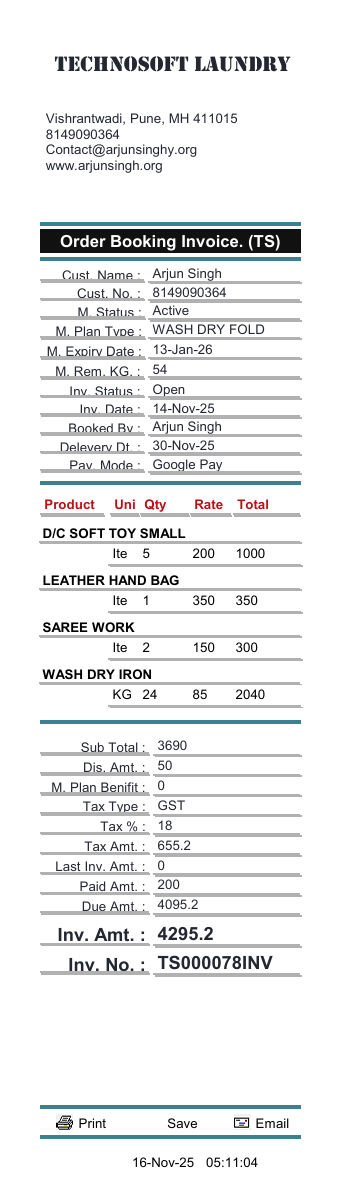
  • PDF invoice generation with company branding

๐Ÿ‘ฅ Membership and Loyalty Program

  • Multiple plan types (Wash Dry Fold, Premium, etc.)
  • KG-based benefit system with prepaid packages
  • Automatic benefit deduction during order booking
  • Plan expiry management with auto-notifications
  • Real-time remaining KG balance tracking
  • Membership renewal and upgrade functionality
  • Tax-exempt membership purchases

๐Ÿ’ฐ Financial Management

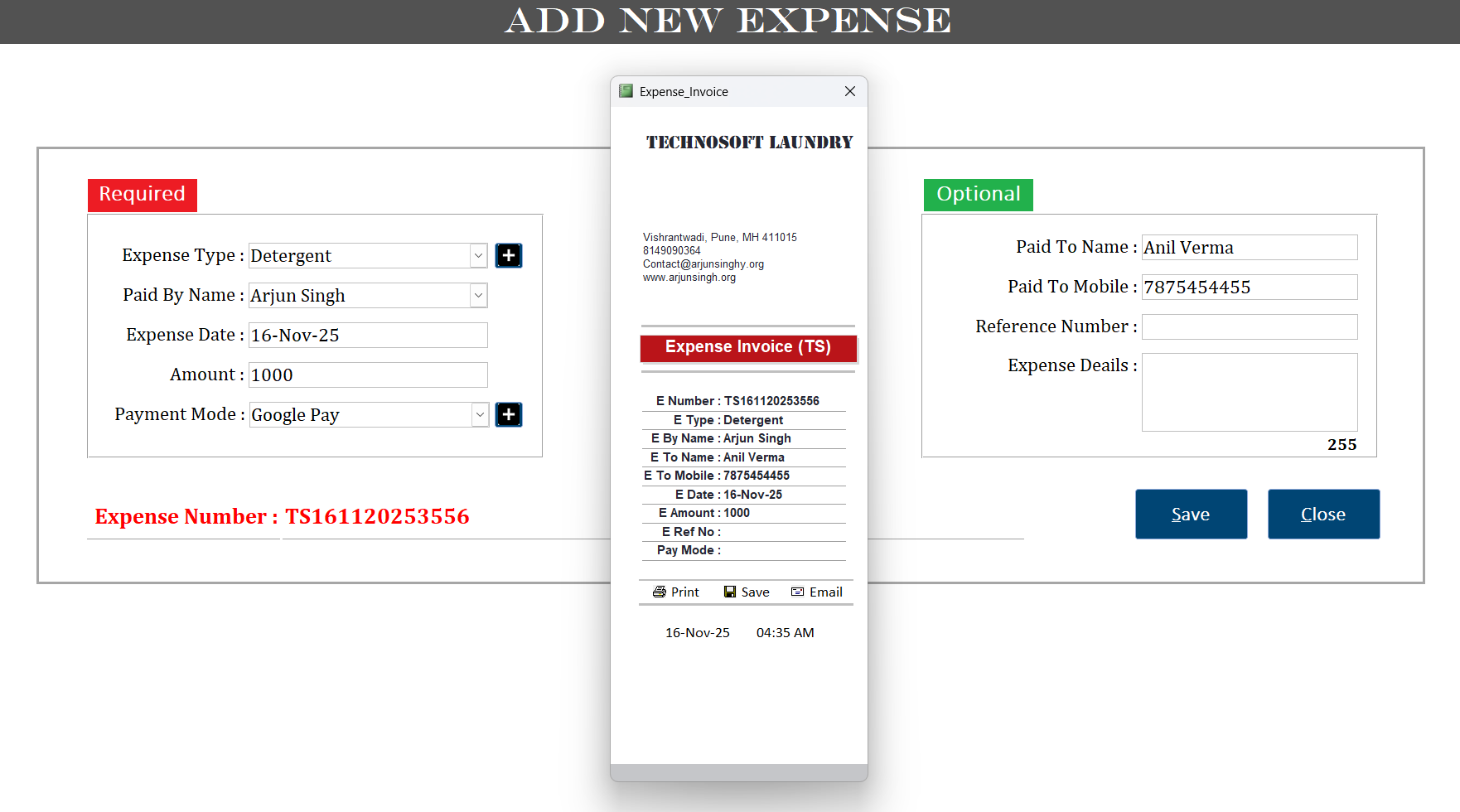
  • Comprehensive expense tracking by category (Detergent, Staff, Utilities)
  • Expense invoice generation with reference numbers
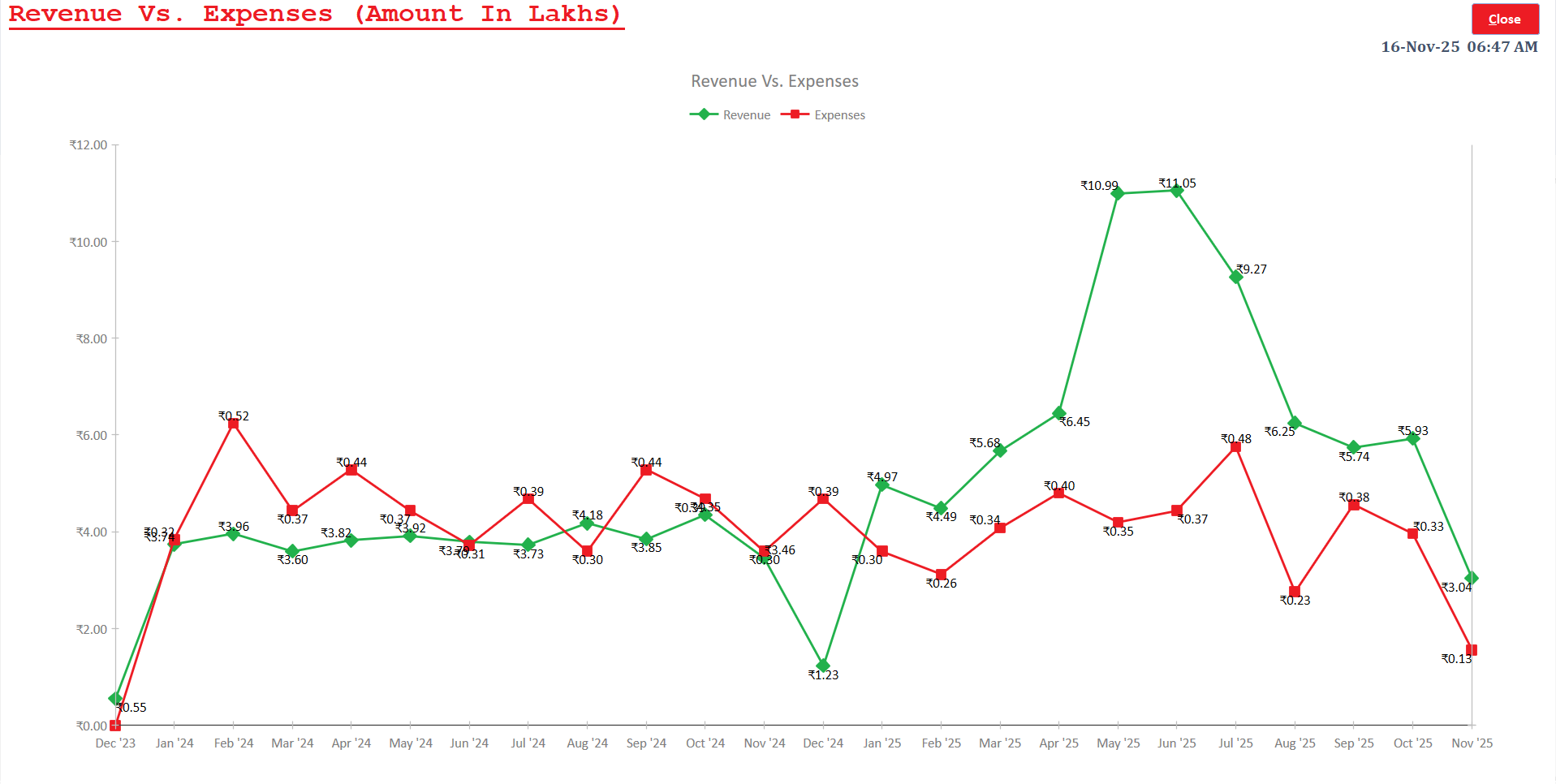
  • Revenue vs. Expenses analysis with graphical trends
  • Period-wise financial reports (Daily, Weekly, Monthly, Quarterly, Yearly)
  • Outstanding payment management and tracking
  • Multi-payment mode support with transaction logging

๐Ÿ“Š Business Analytics Dashboard

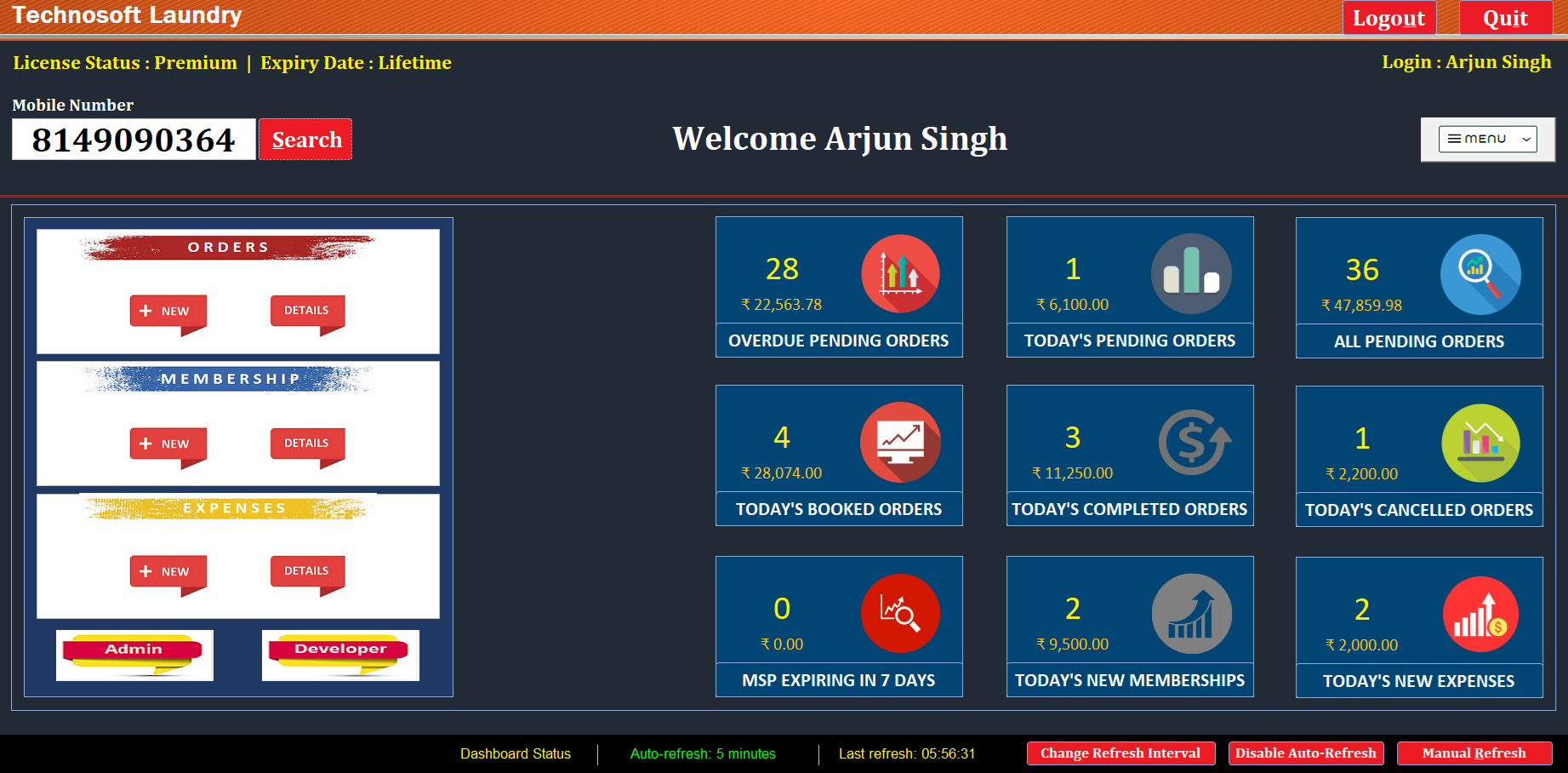
  • Real-time KPI monitoring (28 overdue orders, โ‚น22,563 value displayed)
  • Today's performance metrics (bookings, completions, cancellations)
  • Membership statistics and expiry alerts
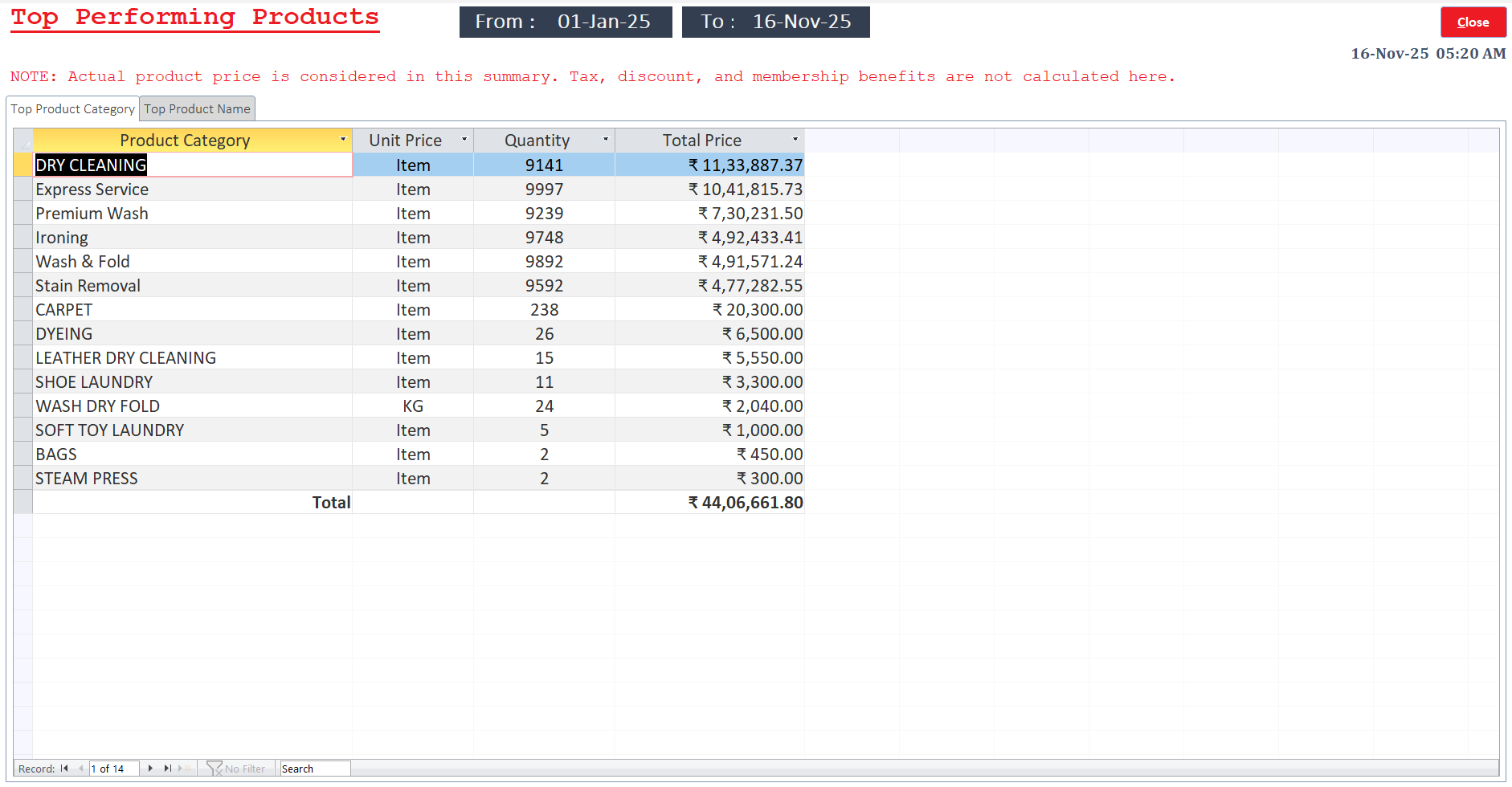
  • Top performing products analysis
  • Top 50 customers by revenue contribution
  • Growth trend analysis and forecasting
  • Auto-refresh dashboard (5-minute intervals)

๐Ÿ‘ค Customer Intelligence (360ยฐ View)

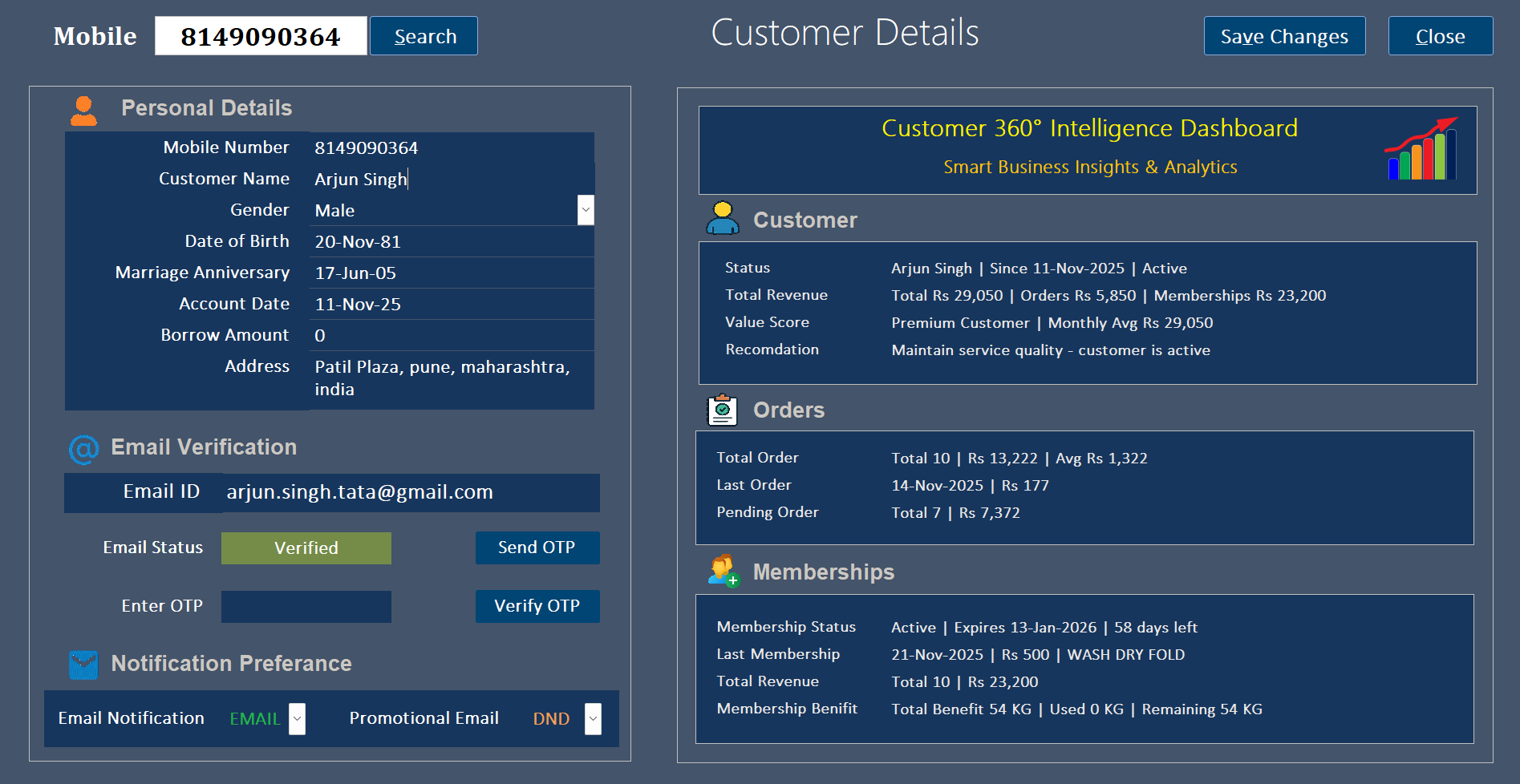
  • Complete customer profile with personal details
  • Revenue analytics: Total revenue, average order value
  • Order history tracking (Total 10 orders, โ‚น13,222)
  • Membership status and benefit tracking (54 KG remaining)
  • Email verification with OTP system
  • Birthday and anniversary tracking for marketing
  • Customer value scoring (Premium Customer classification)

3. Installation & System Requirements

โš™๏ธ System Requirements

Software Requirements

  • Microsoft Access 2016 or later (64-bit must)
  • Windows 10/11 (64-bit must)
  • Microsoft Excel 2016+ (for export features)
  • PDF Reader for invoice printing
  • Outlook with app password (for email notifications)

Hardware Requirements

  • D: Drive with 500MB free space
  • 4GB RAM (8GB recommended)
  • Screen Resolution: 1366x768 or higher
  • Stable system for hardware fingerprinting

๐Ÿ“ฆ Installation Steps

1
Download & Extract: Download Technosoft_LMS.zip and extract directly to D:\ drive root (mandatory location)
2
Verify Folders: Extraction automatically creates 6 specialized folders on D: drive
3
Launch Application: Navigate to D:\Laundry_Management_App\ and double-click Technosoft_Laundry.accde
4
Create Account: Click "Create Account?" on login screen and set up your credentials
5
Activate License: Complete online or offline license activation process
6
Configure System: Set up company details, products, and begin operations

๐Ÿ“ Folder Structure (Auto-Created on D: Drive)

D:\
โ”œโ”€โ”€ Laundry_Management_App\ [Main Application Files]
โ””โ”€โ”€ Technosoft_Laundry.accde [Launch this file]
โ”œโ”€โ”€ Laundry_BE_Main_DB_Dont_Touch\ [Database - Do Not Modify]
โ””โ”€โ”€ Laundry_Managment_Backend_Database.accdb
โ”œโ”€โ”€ Laundry_BE_Backup_DB_Dont_Touch\ [Automated Backups]
โ”œโ”€โ”€ Laundry_Excel_Template\ [Import/Export Templates]
โ”œโ”€โ”€ Laundry_Output_Invoice\ [Generated PDF Invoices]
โ””โ”€โ”€ Laundry_Output_Reports\ [Business Reports]
โš ๏ธ Important: Do NOT modify or delete files in folders marked "Dont_Touch" - these contain critical database files with automated backup systems.

๐Ÿ”ง Troubleshooting Common Issues

Application won't start: Ensure extraction to D: drive root (not D:\Downloads or subfolders)

Database errors: Do not modify files in *_Dont_Touch folders; restore from backup if needed

Invoice printing issues: Verify PDF reader installation and default printer settings

Performance slowdown: Regular database maintenance recommended; contact support for optimization

Data export failures: Check Microsoft Excel installation (2016 or later required)

License activation issues: Use offline activation method if online fails; contact support with hardware ID

4. Technical Architecture

Technology Stack

Frontend Layer

  • MS Access Forms (.accde compiled format)
  • Custom VBA form controls and events
  • Responsive UI with dynamic data binding
  • Professional color schemes and branding

Backend Layer

  • MS Access Database Engine (ACE)
  • VBA business logic implementation
  • Stored procedures and queries
  • Data validation and integrity constraints

Database Schema

tbl_Customers

Customer profiles, contact information, membership status, revenue analytics

tbl_Orders

Order details, invoice numbers, status tracking, payment information, delivery dates

tbl_Memberships

Subscription plans, KG benefits, purchase dates, expiry dates, benefit utilization

tbl_Products

Service catalog, product categories, pricing, units, GST classifications

tbl_Expenses

Expense transactions, categories, amounts, payment modes, reference numbers

tbl_Employees

Staff management, access control, login credentials, role-based permissions

5. Module-wise Functionality

Order Management Module

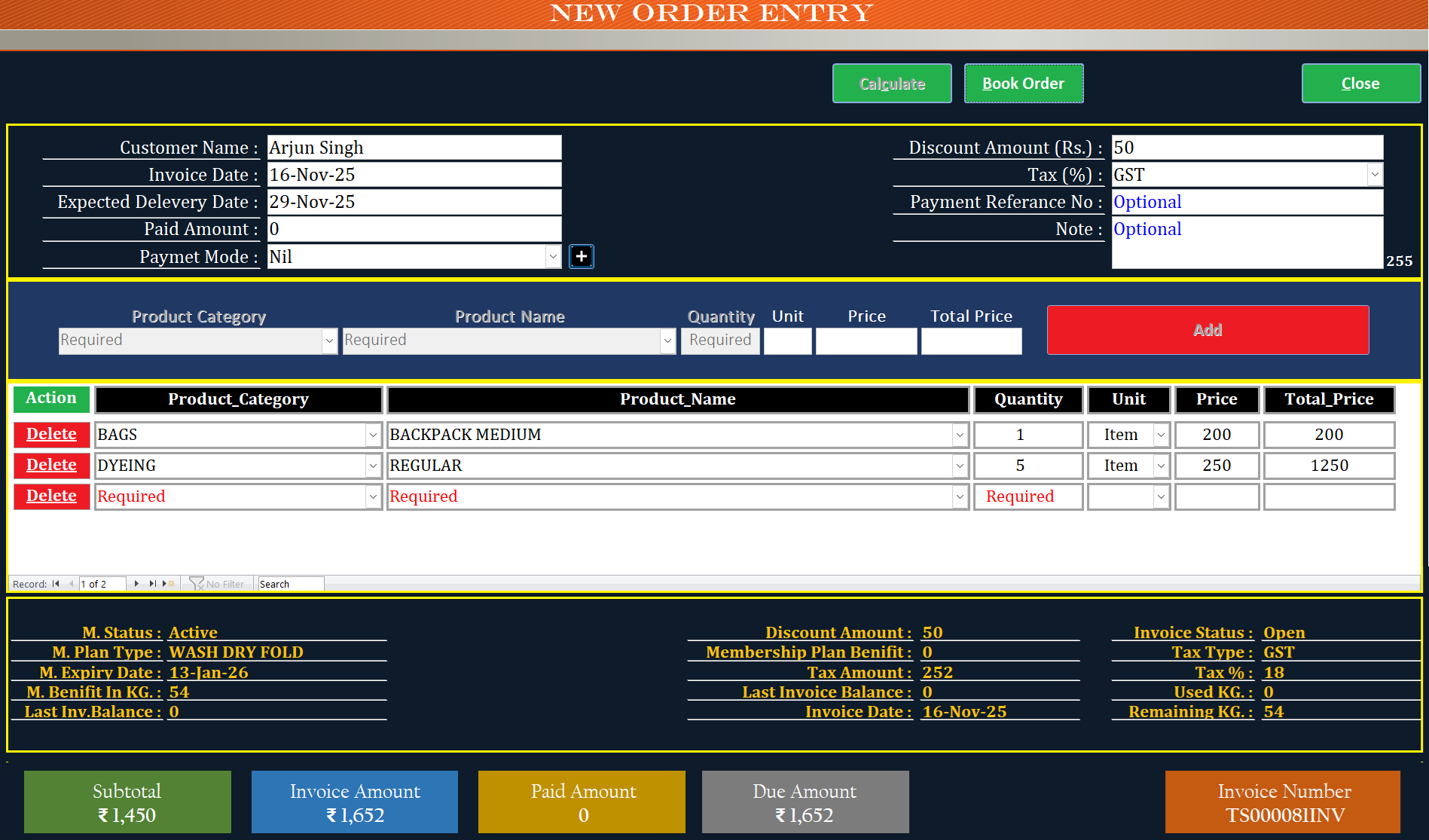
New Order Entry: Quick order booking with automatic calculations, customer search, product selection

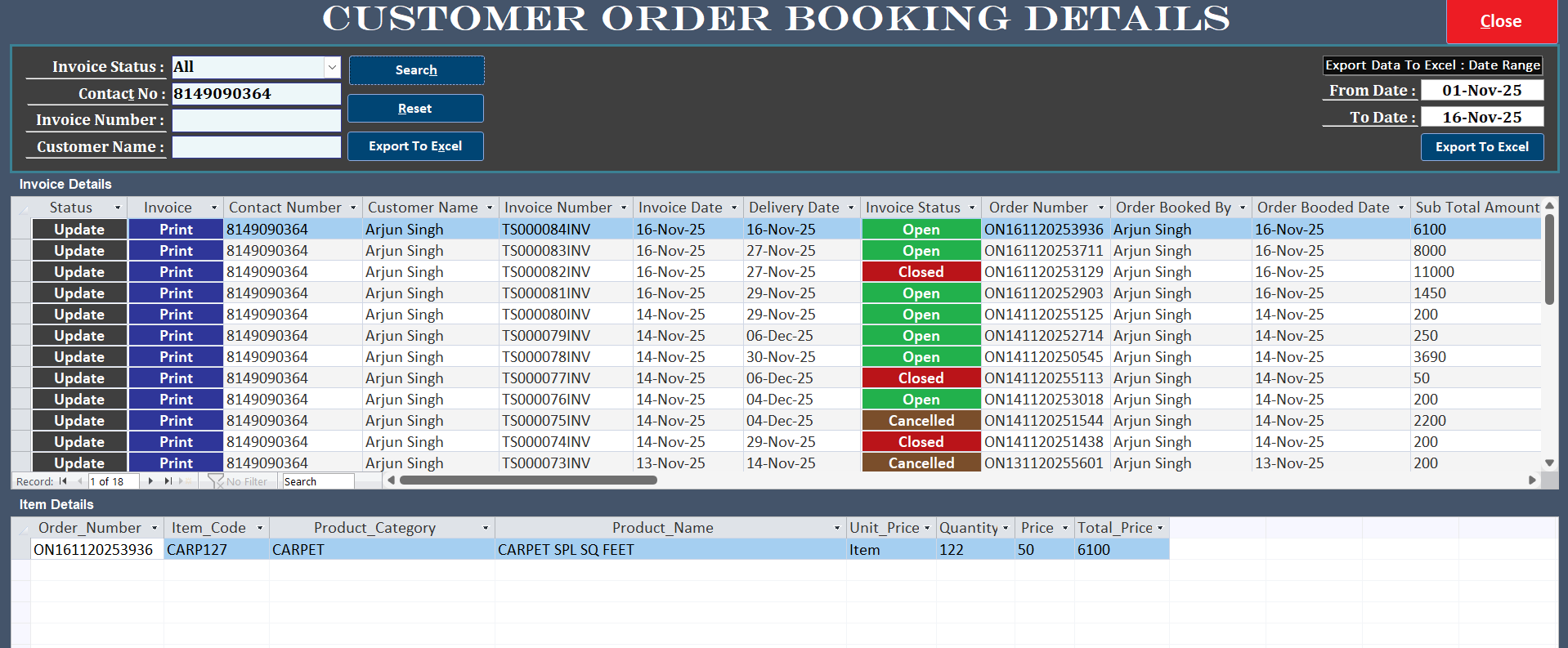
Order Details: View/update order status, print invoices, track delivery dates, manage payments

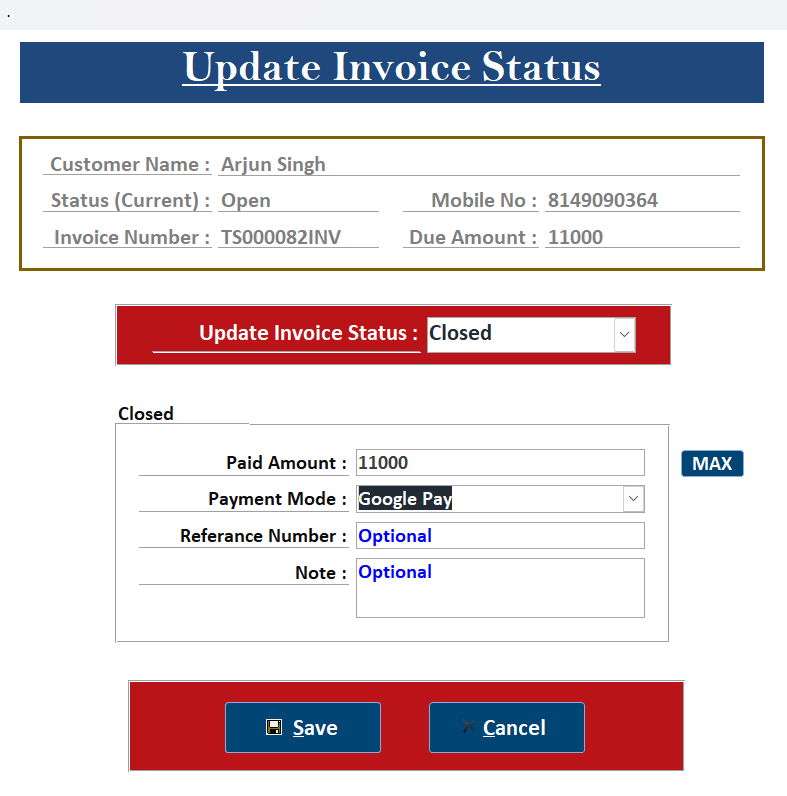
Status Updates: Change status from Open โ†’ Closed, record payments, update delivery dates

Invoice Export: PDF generation, email sending, Excel export for bulk analysis

Membership Management Module

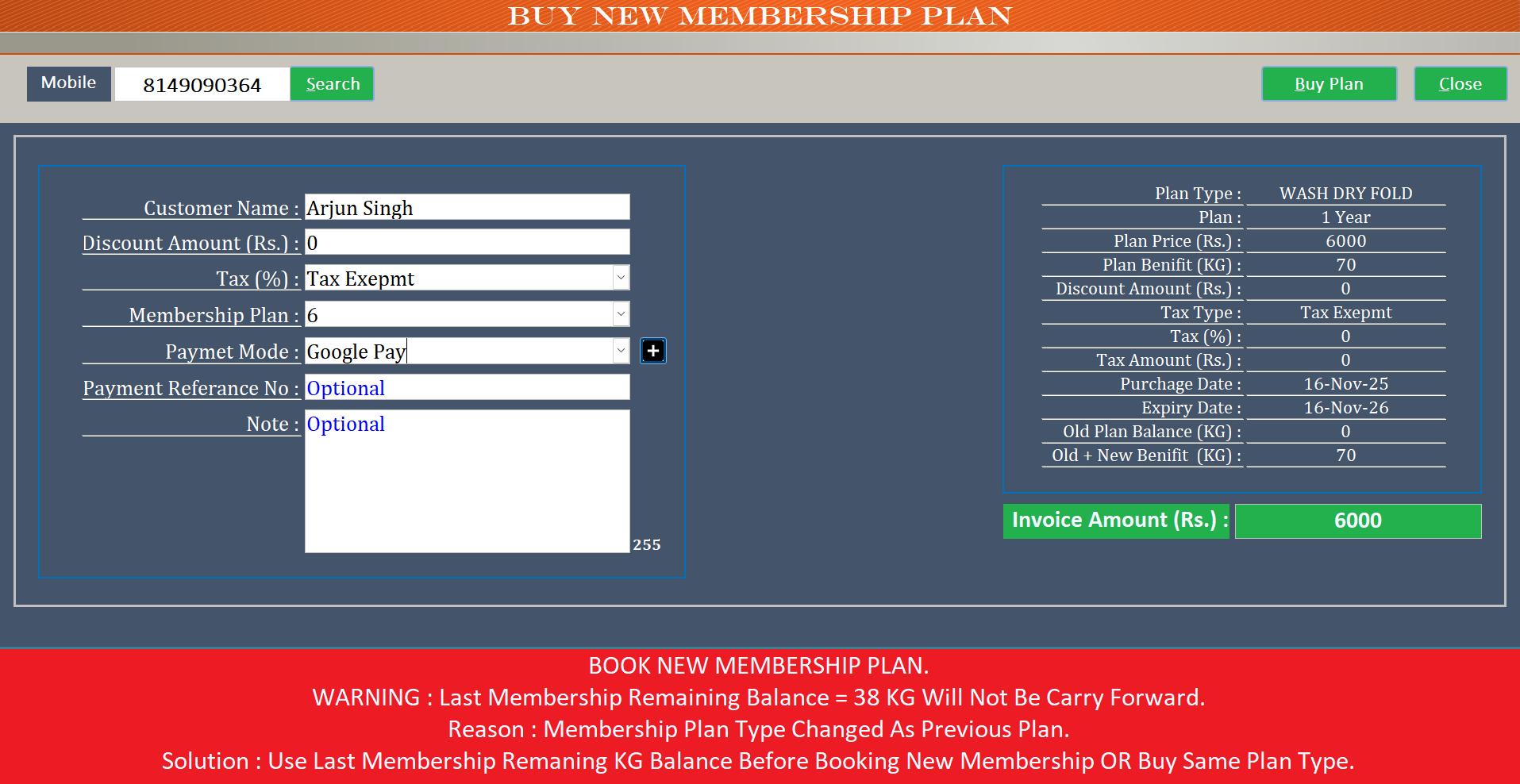
Plan Purchase: Buy new plans (WASH DRY FOLD: โ‚น6000 for 70 KG), tax-exempt purchases

Benefit Tracking: Real-time KG balance updates, automatic deduction during orders

Expiry Alerts: Dashboard alerts for plans expiring in 7 days

Plan Changes: Warning system for plan type changes with balance carryforward rules

Expense Management Module

Expense Entry: Record expenses by category (Detergent, Staff, Utilities), payment modes

Invoice Generation: Create expense invoices (TS161120253556 format) with full details

Analytics: Revenue vs. Expenses comparison graphs, monthly trend analysis

Reports: Period-wise expense summaries, category breakdowns, cost optimization insights

Analytics and Reporting Module

Dashboard View: Real-time KPIs with auto-refresh (5-minute intervals), key business metrics

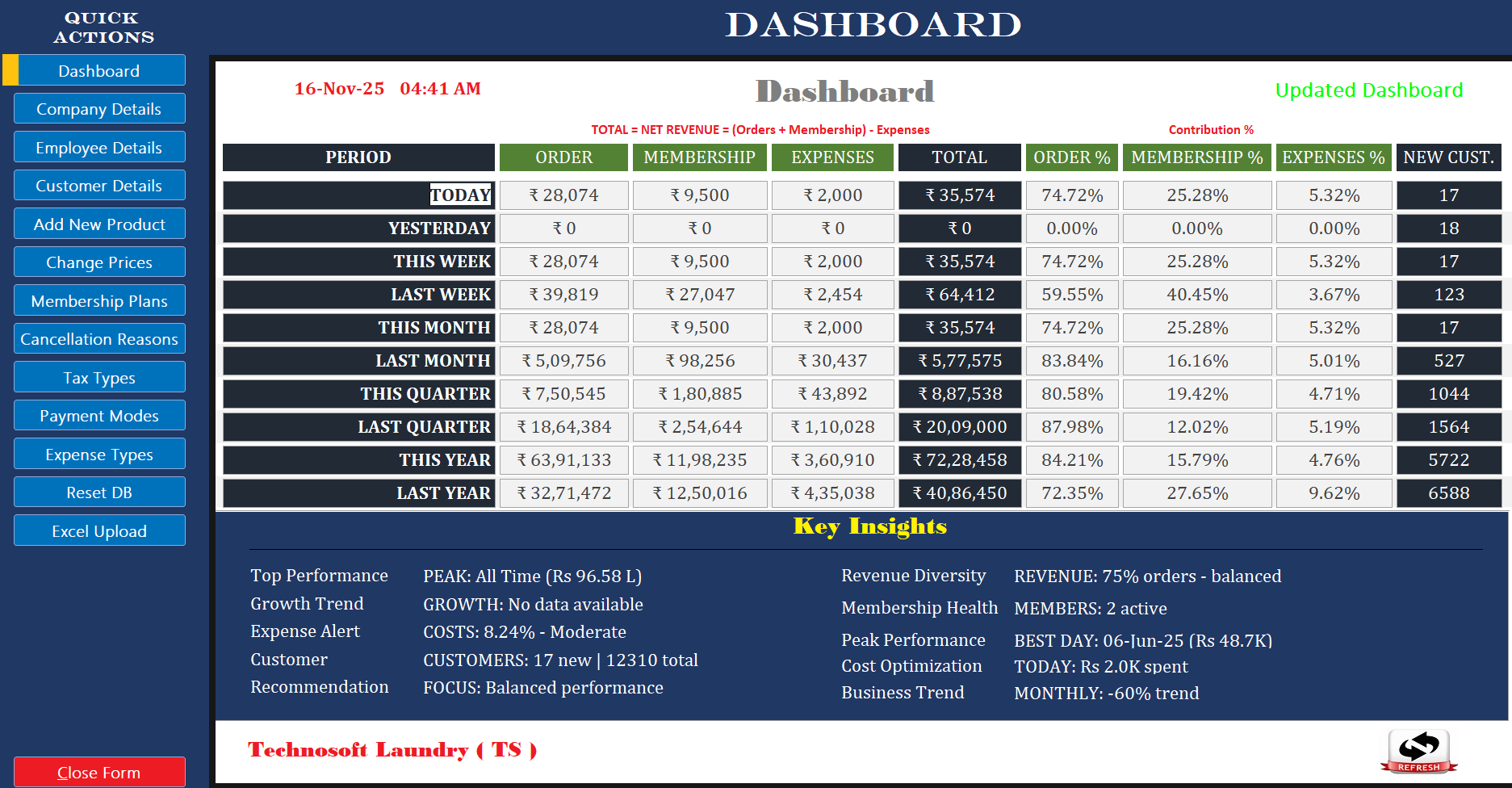
Performance Data: Today โ‚น35,574 (74.72% orders, 25.28% membership, 5.32% expenses)

Product Analysis: Top products: DRY CLEANING โ‚น11.3L, Express Service โ‚น10.4L

Customer Ranking: Top 50 customers by revenue (Arjun Singh: โ‚น39,096 as #1)

6. User Guide and Workflows

Order Booking Workflow

1
Search Customer: Enter mobile number (8149090364) and click Search
2
Select Products: Choose category (BAGS), product (BACKPACK MEDIUM), quantity (1)
3
Add Items: Click "Add" button to add to order, repeat for multiple items
4
Review Details: Check subtotal (โ‚น1,450), GST 18% (โ‚น252), total (โ‚น1,652)
5
Apply Benefits: System auto-applies membership benefits if available (54 KG remaining)
6
Book Order: Click "Book Order" to generate invoice (TS00008IINV)

Payment Collection Workflow

1
Open Order Details: Search customer and click "Update" on pending order
2
Update Status: Change invoice status from "Open" to "Closed"
3
Enter Payment: Enter paid amount (โ‚น11000), select payment mode (Google Pay)
4
Add Reference: Optional payment reference number and notes
5
Save Transaction: Click "Save" to record payment and update status

Membership Purchase Workflow

1
Search Customer: Enter mobile number and click Search
2
Select Plan: Choose plan (WASH DRY FOLD - 1 Year - โ‚น6000 - 70 KG)
3
Review Warning: Check for plan type change warning (balance carryforward rules)
4
Select Payment: Choose payment mode (Google Pay) and add optional reference
5
Complete Purchase: Click "Buy Plan" to activate membership

7. Pricing & Licensing

๐Ÿ’ฐ Pricing Plans

Free Version

โ‚น0
3 Months Trial

Features:

  • โœ“ All core features included
  • โœ“ GST invoicing enabled
  • โœ“ Basic analytics dashboard
  • โœ“ Customer management
  • โš ๏ธ Maximum 100 total records
  • (Orders + Membership + Expenses combined)

Perfect for testing & evaluation

RECOMMENDED

Premium Version

โ‚น11,800
โ‚น10,000 + 18% GST
Lifetime License

Features:

  • โœ“ Unlimited records - no restrictions
  • โœ“ All advanced features unlocked
  • โœ“ Full business analytics suite
  • โœ“ Priority technical support
  • โœ“ Free lifetime updates
  • โœ“ Online or offline activation
  • โœ“ One-time payment, lifetime use
  • โœ“ Hardware-locked license

Best for serious laundry businesses

๐Ÿ”‘ License Activation Process

Online Activation (Instant)

1
Purchase license key from official website
2
Launch application and click "Activate now"
3
Enter company details and license key
4
Click "Save Information" for instant activation
5
System binds license to hardware fingerprint

Offline Activation (24-48 hours)

1
Click "Offline License Key Activation"
2
Fill company details and click "Save Information"
3
System generates WIN.ZIP file with hardware data
4
Email WIN.ZIP to contact@arjunsingh.org
5
Receive license file via email within 24-48 hours

๐Ÿ”’ Hardware Fingerprinting Security

Each license is securely bound to your specific computer system. The system captures hardware identifiers during activation to ensure your license is protected and cannot be used on unauthorized systems.

๐Ÿ’ณ Payment & Purchase Information

Premium License Price: โ‚น10,000 + 18% GST = โ‚น11,800

Payment Methods Accepted:

  • Bank Transfer / NEFT / RTGS
  • UPI Payment (Google Pay, PhonePe, Paytm)
  • Online Payment Gateway

What You Get:

  • Lifetime license key (no recurring fees)
  • Instant online activation OR offline activation within 24-48 hours
  • Free lifetime software updates
  • Priority technical support
  • GST invoice for your purchase

8. Security and Data Privacy

๐Ÿ”’ License Management

  • Hardware fingerprinting for secure system-bound licensing
  • Online and offline activation processes
  • Lifetime premium license with one-time purchase
  • Anti-piracy protection with automated system validation
  • License expiry date: Lifetime (31-Dec-2099)

๐Ÿ›ก๏ธ Data Security

  • Local database storage for complete data privacy and control
  • Role-based access control: Employee vs. Administrator privileges
  • Data export controls for business intelligence
  • Automated backup capabilities for data protection
  • Secure password management with change/reset features

9. Business Impact and ROI

๐Ÿ“ˆ Operational Efficiency

  • 90% reduction in manual calculation errors
  • 75% time savings in order processing
  • 100% accuracy in tax compliance
  • Instant invoice generation

๐Ÿ˜Š Customer Experience

  • Instant professional invoicing
  • Transparent pricing breakdowns
  • 40% increase in customer retention
  • Automated communication

๐Ÿ’ผ Financial Control

  • Real-time revenue tracking
  • 25% reduction in operational costs
  • 30% improvement in cash flow
  • Better decision making with analytics

๐Ÿ“Š Key Performance Metrics (Based on Dashboard)

Annual Performance: โ‚น72.28 Lakhs total revenue (โ‚น63.91L orders + โ‚น11.98L memberships - โ‚น3.60L expenses)

Revenue Mix: 84.21% from orders, 15.79% from memberships, 4.76% expense ratio

Customer Base: 5,722 total customers with 17 new customers added recently

Peak Performance: Best day generated โ‚น48.7K revenue (06-Jun-25)

Growth Trend: Monthly trend showing -60% (indicating seasonal variation)

10. System Walkthrough

๐Ÿ“ธ Visual System Documentation

All system screenshots are available in the dedicated gallery section below. This includes complete visual walkthrough of dashboard, order management, customer profiles, analytics, and all other modules.

View All Screenshots โ†’

System Screenshots Gallery

Complete visual walkthrough of all application modules and features

18 Screenshots Available
Technosoft LMS Dashboard - Centralized control panel with analytics

Main Dashboard

Centralized control panel with real-time business analytics and quick navigation

Technosoft LMS Admin Dashboard - Administrative controls and settings

Admin Analytics Dashboard

Comprehensive business intelligence with period-wise performance metrics

Technosoft LMS Customer Details - Comprehensive customer profile management

Customer Profile Management

Detailed customer profiles with 360ยฐ intelligence and analytics

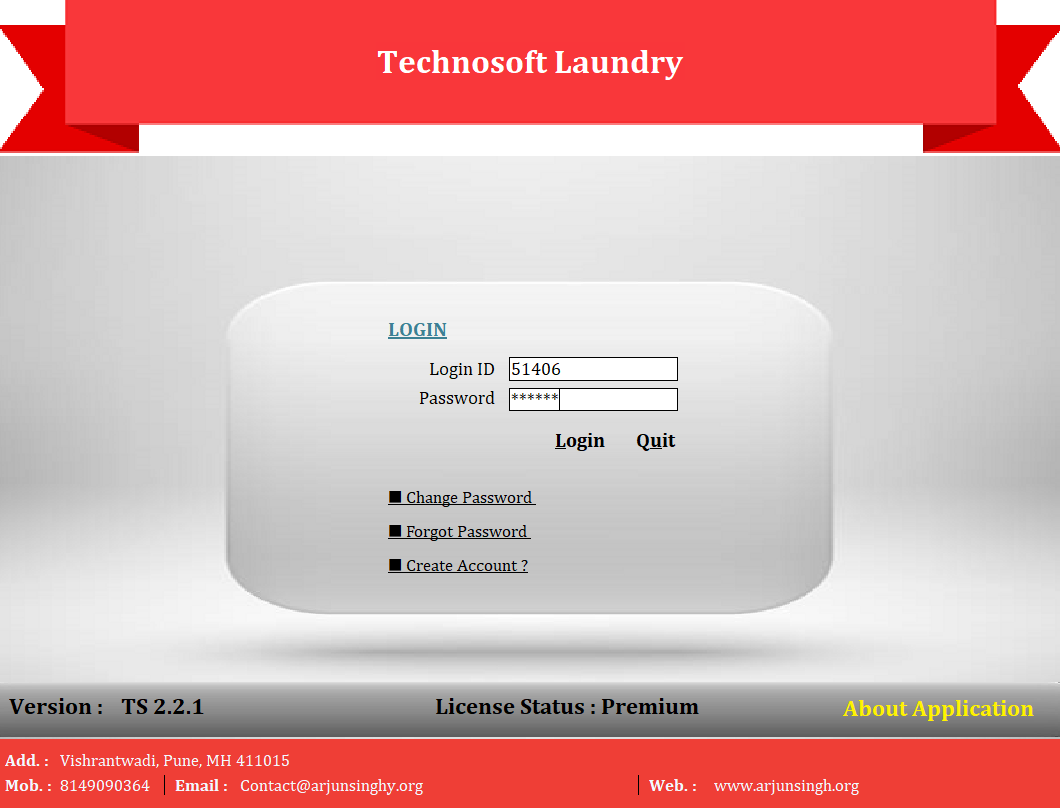
Technosoft LMS Login Screen - Secure authentication with license validation

Secure Login Interface

Role-based authentication system with hardware-based license validation

Technosoft LMS New Order Entry - Smart order management interface

New Order Entry

Smart order management with automatic pricing and product categories

Technosoft LMS Order Details - Comprehensive order tracking and management

Order Details & Tracking

Detailed order information with status tracking and customer communication history

Technosoft LMS Invoice Status - Order status management

Order Status Management

Update order status from booking to delivery with payment tracking

Technosoft LMS Customer Invoice - GST compliant billing

GST Invoice Generation

Professional GST-compliant invoices with tax calculations and membership benefits

Technosoft LMS Membership Entry - KG-based membership plans

Membership Plan Management

Flexible membership system with KG-based benefits and auto-expiry tracking

Technosoft LMS Expense Entry - Business expense tracking

Expense Management

Track business expenses with categorization and reporting capabilities

Technosoft LMS Revenue vs Expense - Financial performance analytics

Revenue vs Expense Analytics

Financial performance dashboard comparing revenue against business expenses

Technosoft LMS Top Products - Product performance analytics

Product Performance Analytics

Top performing products analysis with revenue and quantity tracking

Technosoft LMS Top Customers - Customer analytics and ranking

Customer Analytics

Top 50 customers by revenue with detailed performance metrics

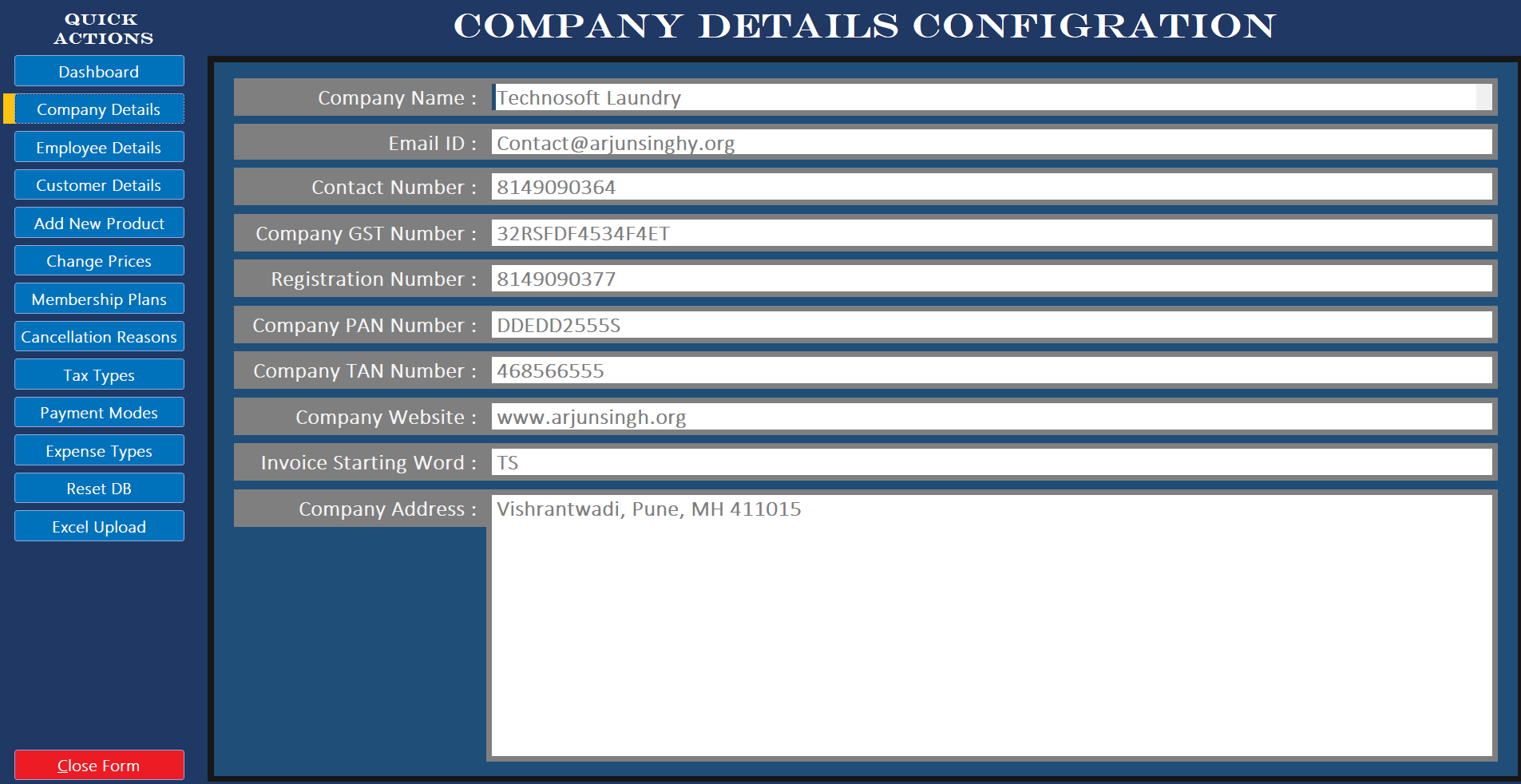
Technosoft LMS Company Details - Business configuration settings

Business Configuration

Company details setup with GST, PAN details and system settings

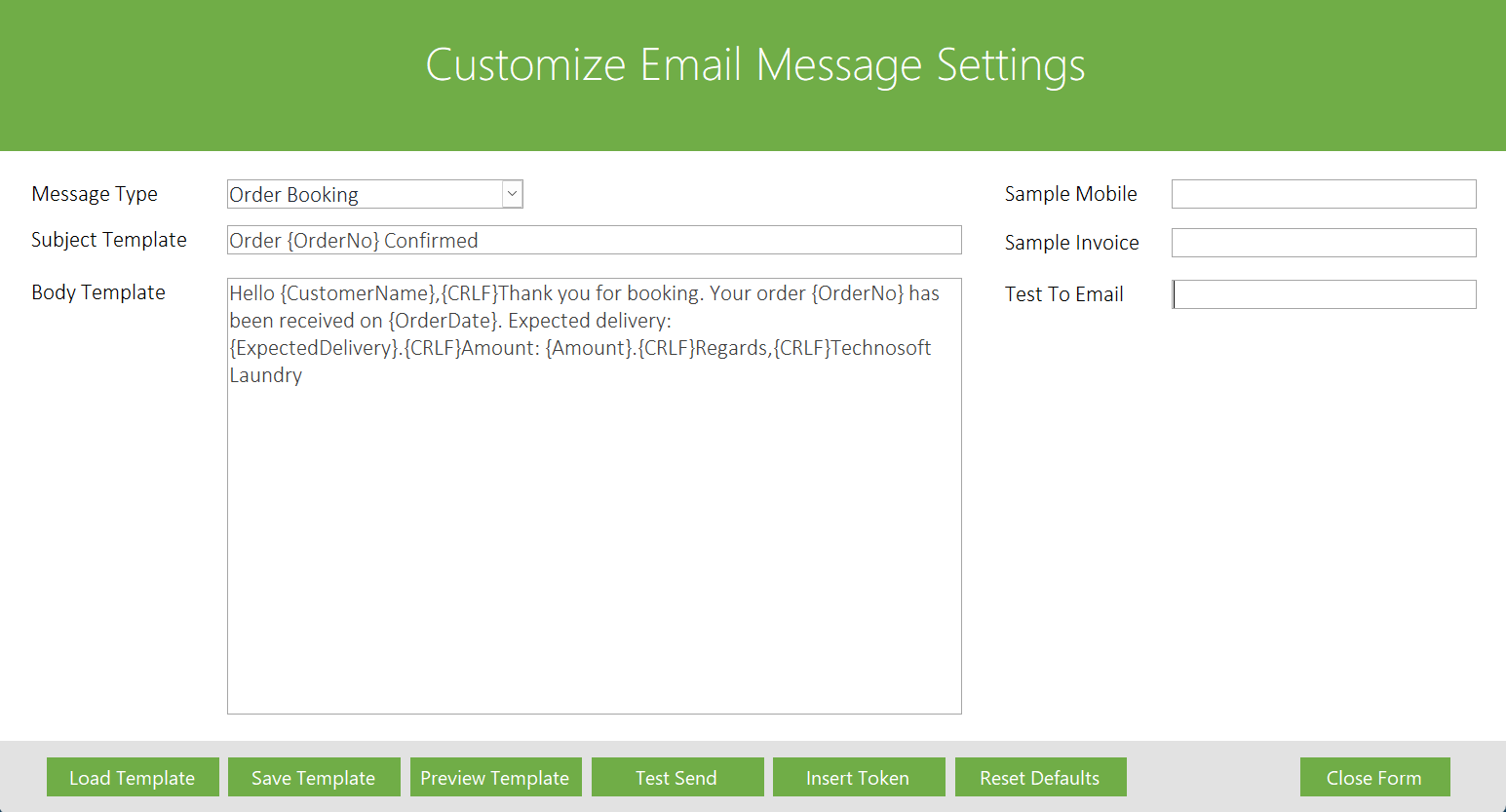
Technosoft LMS Email Message Settings - Customizable email templates

Email Automation

Customizable email templates with tokens for automated customer communications

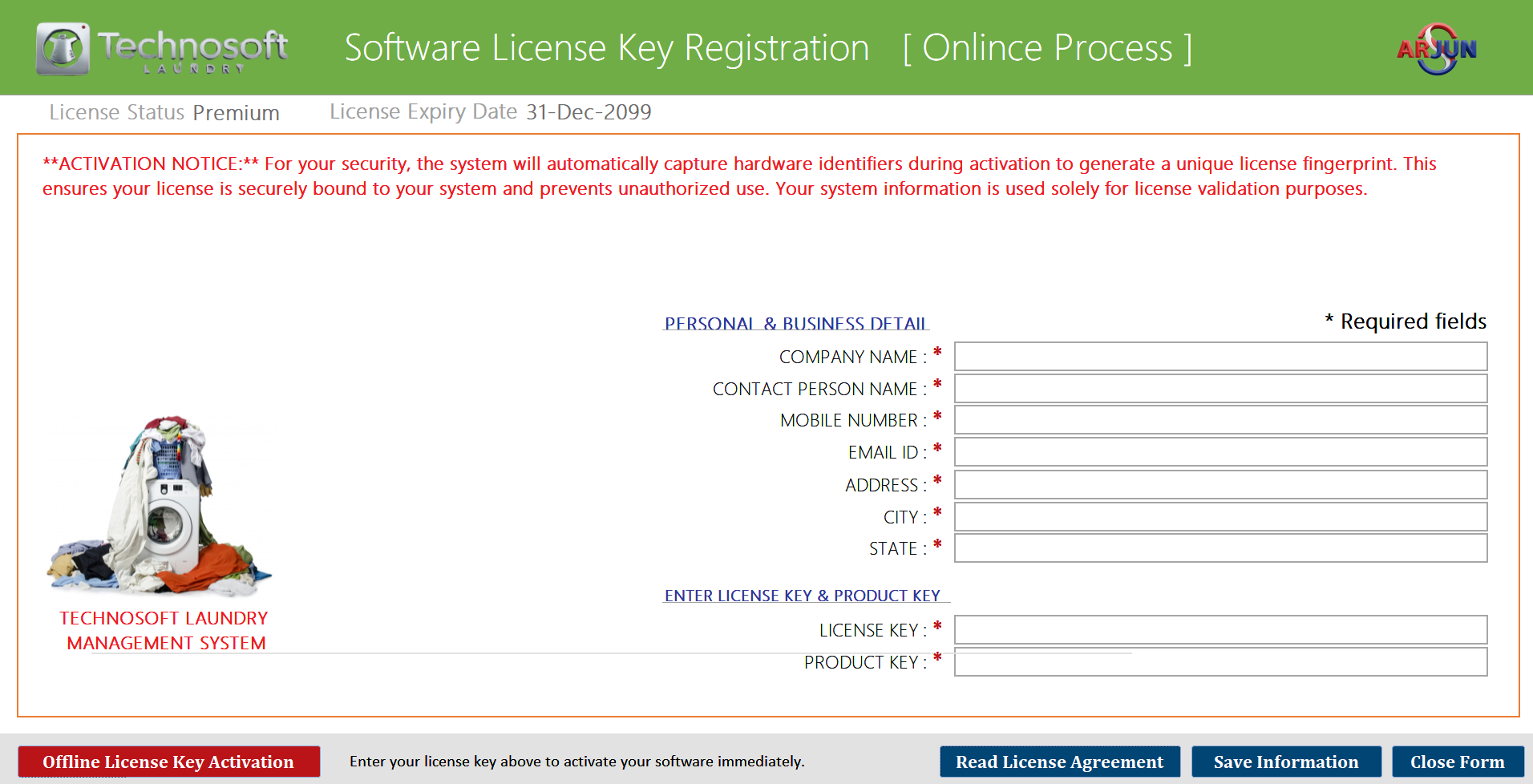
Technosoft LMS Online License Activation - Secure licensing system

Online License Activation

Secure online license activation with hardware fingerprinting

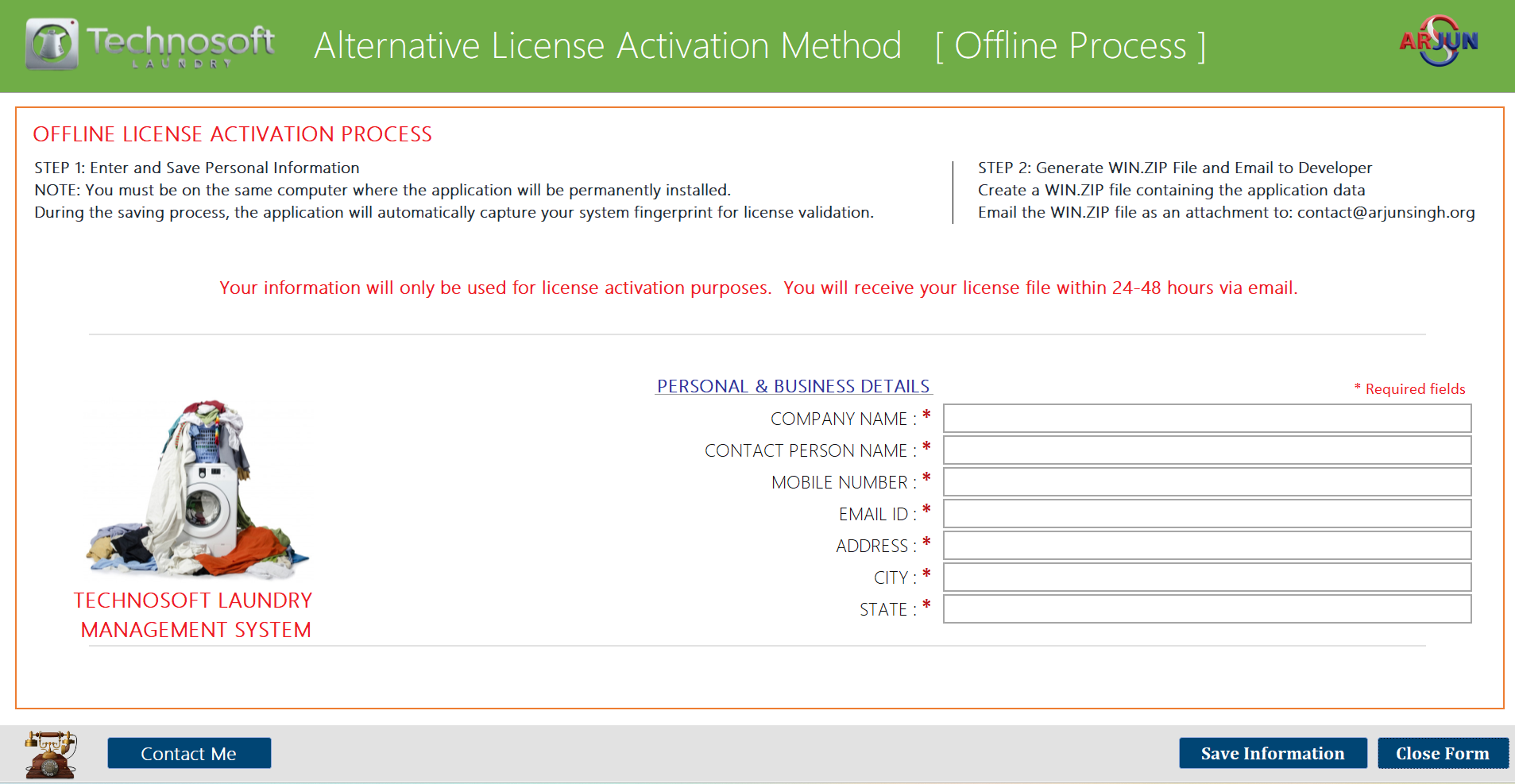
Technosoft LMS Offline License Activation - Alternative licensing method

Offline License Activation

Alternative licensing method with system fingerprint capture

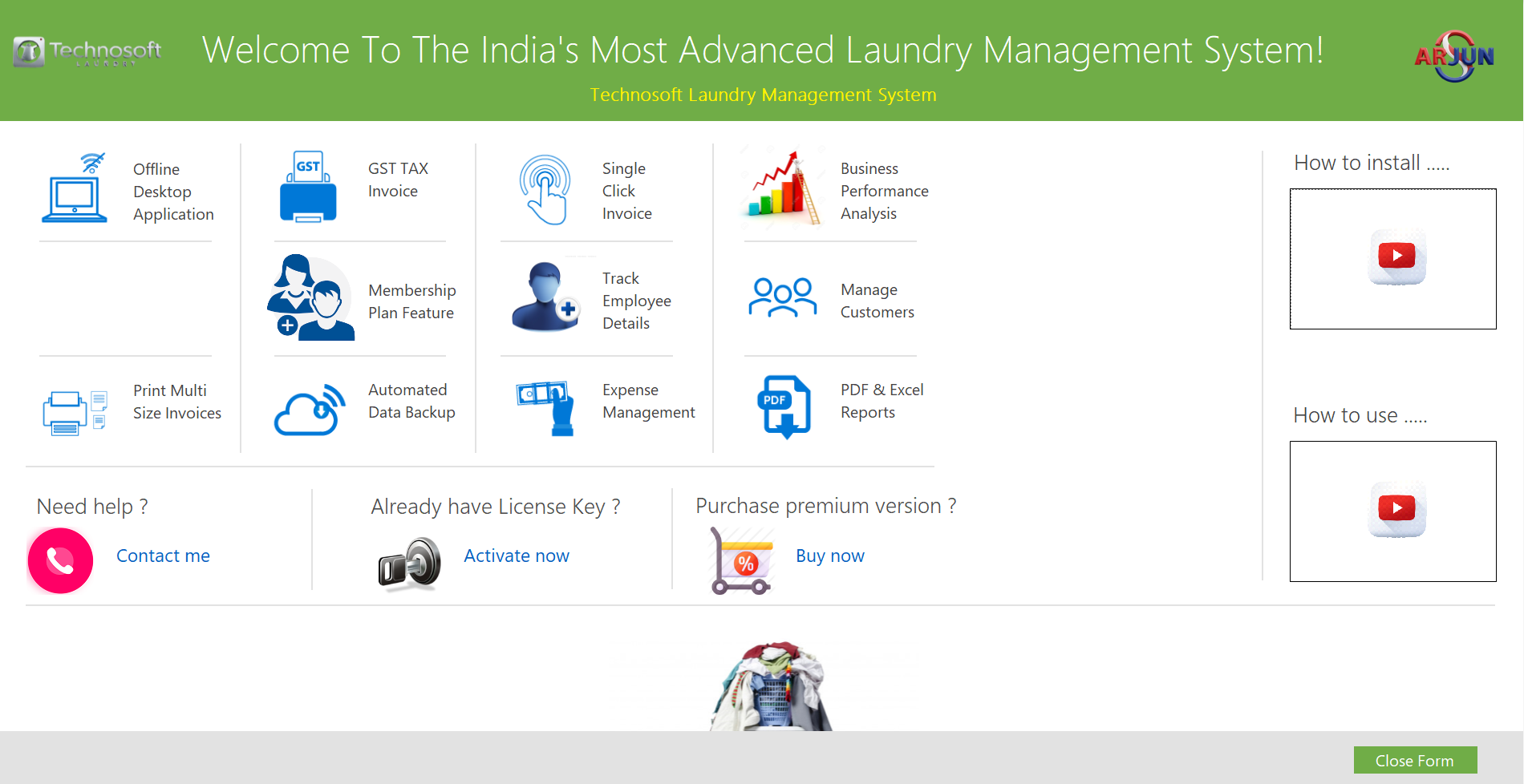
Technosoft LMS Features - Application features overview

Application Features

Overview of all features including offline desktop application, GST invoices, and automated data backup

Click on any screenshot to view in full size. Use โ† โ†’ arrow keys to navigate.

Ready to Transform Your Laundry Business?

Choose how you'd like to engage with Technosoft LMS

๐Ÿ“ฅ

Download Demo

Test the full application with sample data

Download Now
๐ŸŽฌ

Live Demo

Schedule a personalized walkthrough

Request Demo
๐Ÿ’ผ

Commercial License

Discuss enterprise implementation

Contact Me